
Google Earth เทคนิคใช้ร่วมกับ AI เพื่อสร้างคอนเทนต์ยุคใหม่
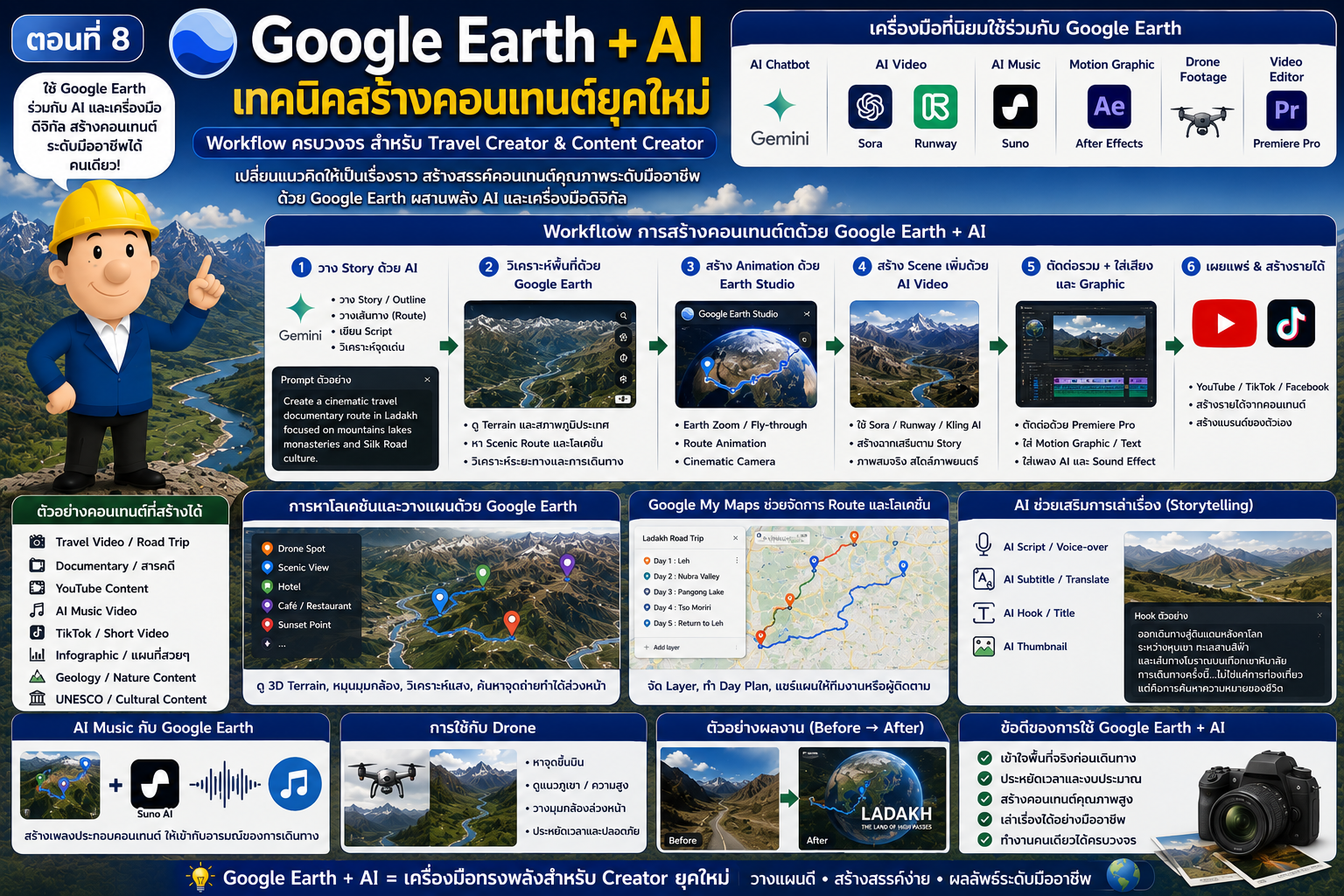
Google Earth เทคนิคใช้ร่วมกับ AI เพื่อสร้างคอนเทนต์ยุคใหม่
โลกของการสร้างคอนเทนต์กำลังเปลี่ยนแปลงอย่างรวดเร็ว จากอดีตที่การทำวิดีโอ บทความ หรือสารคดีต้องใช้ทีมงานจำนวนมาก ปัจจุบันเทคโนโลยี AI และเครื่องมือดิจิทัลสมัยใหม่ได้เข้ามาช่วยให้ Creator สามารถสร้างผลงานระดับมืออาชีพได้ด้วยอุปกรณ์เพียงไม่กี่ชิ้น หนึ่งในเครื่องมือที่มีบทบาทสำคัญมากขึ้นเรื่อยๆ คือ Google Earth ซึ่งเมื่อใช้งานร่วมกับ AI จะกลายเป็น “ศูนย์กลางการสร้างคอนเทนต์ด้านภูมิศาสตร์และการเดินทาง” ที่ทรงพลังอย่างมาก ปัจจุบัน Creator ระดับมืออาชีพจำนวนมากใช้ Google Earth ร่วมกับ:
- AI Chatbot
- AI Video Generator
- AI Music
- Motion Graphic
- Drone Footage
- GIS Data
- Documentary Workflow
เพื่อสร้าง:
- Travel Video
- Documentary
- YouTube Content
- TikTok
- Infographic
- AI Music Video
- Geology Content
- UNESCO Content
- Smart Tourism Media
ในบทความนี้ เราจะพาไปรู้จัก Workflow ยุคใหม่ของการใช้ Google Earth ร่วมกับ AI เพื่อสร้างคอนเทนต์ระดับมืออาชีพ
ทำไม Google Earth ถึงสำคัญกับ Creator ยุคใหม่
Google Earth มีจุดเด่นที่แตกต่างจากแผนที่ทั่วไป เพราะสามารถ:
- แสดงโลกแบบ 3D
- แสดง Terrain จริง
- แสดงภาพดาวเทียม
- วิเคราะห์ Route
- จำลองการบิน
- ใช้ร่วมกับ Earth Studio
สิ่งเหล่านี้ทำให้ Google Earth กลายเป็น:
- เครื่องมือวาง Story
- เครื่องมือวาง Route
- เครื่องมือหา Location
- เครื่องมือสร้าง Visual
ได้ในเวลาเดียวกัน
การเปลี่ยนแปลงของโลก Creator
ในอดีตการทำ Travel Documentary ต้องใช้:
- ทีมถ่ายทำ
- นักตัดต่อ
- Motion Graphic
- นักทำแผนที่
แต่ปัจจุบัน Creator คนเดียวสามารถใช้:
- AI
- Google Earth
- Earth Studio
- Sora
- Runway
- Canva
สร้างงานระดับสูงได้
Workflow ยุคใหม่ของ Creator
ปัจจุบัน Workflow สาย Travel และ Documentary มักมีลักษณะดังนี้
Step 1 วาง Story ด้วย AI
ใช้ AI เช่น:
ช่วย:
- วาง Story
- สร้าง Outline
- วาง Route
- เขียน Script
ตัวอย่าง Prompt
Create a cinematic travel documentary route in Ladakh focused on mountains lakes monasteries and Silk Road culture
AI จะช่วย:
- วางเส้นทาง
- วิเคราะห์จุดเด่น
- จัดลำดับ Story
Step 2 ใช้ Google Earth วิเคราะห์พื้นที่
หลังจากได้ Route จาก AI ให้ใช้ Google Earth เพื่อ:
- ดู Terrain
- วิเคราะห์ภูเขา
- ดูลำน้ำ
- ดูเมือง
- หา Scenic Route
ประโยชน์สำคัญ
ช่วยให้ Creator:
- เข้าใจพื้นที่จริง
- วางมุมกล้อง
- หาโลเคชัน
- วิเคราะห์การเดินทาง
ได้ง่ายขึ้นมาก
Step 3 ใช้ Google Earth Studio สร้าง Animation
Google Earth Studio ช่วยสร้าง:
- Earth Zoom
- Route Animation
- Cinematic Fly-through
ตัวอย่าง
เส้นทาง:
Bangkok → Delhi → Srinagar → Leh
Earth Studio จะช่วย:
- สร้างเส้นทางบิน
- Zoom โลก
- Follow Route
ทำให้วิดีโอดูระดับสารคดีทันที
Step 4 ใช้ AI Video Generator
ปัจจุบันนิยมใช้:
- Sora
- Runway
- Kling AI
- Pika
สร้าง Scene เพิ่มเติม
ตัวอย่างการใช้งาน
Travel Video
Google Earth:
สร้าง Route
↓
AI:
สร้าง Scene ตลาดอินเดีย / ถนนหิมาลัย
↓
Premiere:
ตัดต่อรวม
การใช้ AI สร้าง Storytelling
AI ช่วยสร้าง:
- Narrative
- Script
- Voice-over
- Subtitle
- Hook
ได้เร็วมาก
ตัวอย่าง
ทริป Kashmir
AI สามารถเขียน:
- Opening
- บรรยายภูเขา
- ประวัติศาสตร์เส้นทางสายไหม
- Story การเดินทาง
ได้ทันที
การหาโลเคชันด้วย Google Earth
Creator ระดับมืออาชีพใช้ Google Earth เพื่อหา:
- จุดถ่าย Drone
- จุดชมวิว
- ถนนสวย
- ทะเลสาบ
- หุบเขา
เทคนิคหา Cinematic Spot
ใช้ Terrain 3D
หมุนมุมกล้องเพื่อดู:
- แนวภูเขา
- ทิศแสง
- หุบเขา
- ถนนคดเคี้ยว
พื้นที่ยอดนิยมสำหรับ Creator
ธรรมชาติ
- Himalaya
- Iceland
- Patagonia
- Tibet
เมือง
- Seoul
- Tokyo
- Dubai
- New York
การสร้าง Route Story
Travel Creator ยุคใหม่ไม่ได้เล่าแค่ “สถานที่”
แต่เล่า:
- การเดินทาง
- ภูมิประเทศ
- อารมณ์
- วัฒนธรรม
Google Earth ช่วยให้:
- เชื่อม Route
- วาง Timeline
- สร้างการเล่าเรื่อง
ได้ดีมาก
Google My Maps กับ Creator
Google My Maps ช่วย:
- วางจุดถ่ายทำ
- วาง Route
- แยกวันถ่าย
- จัด Location
ตัวอย่าง
Layer:
- Drone
- Hotel
- Scenic Spot
- Café
- Sunset
การใช้ AI สร้าง Infographic
Creator สามารถใช้ AI ร่วมกับ:
- Canva
- Adobe Express
- Figma AI
สร้าง:
- Route Map
- Timeline
- Geography Graphic
AI Music กับ Google Earth
อีก Workflow ที่กำลังนิยมมากคือ:
Google Earth + AI Music
ตัวอย่าง
Kashmir Travel Music Video
Google Earth
หา Route และวิว
↓
AI Music
เช่น Suno AI
สร้างเพลง
↓
AI Video
สร้าง Scene
↓
Premiere
ตัดต่อรวม
การใช้ Google Earth กับ YouTube
YouTube Travel Channel ระดับมืออาชีพนิยมใช้:
- Earth Zoom
- Route Animation
- Satellite Scene
เพื่อเพิ่มคุณภาพงาน
เทคนิคสำหรับ YouTube
1. เปิดคลิปด้วย Earth Zoom
ช่วยสร้างความรู้สึก:
- Epic
- Cinematic
- Documentary
2. ใช้ Route Animation
ช่วยให้คนดูเข้าใจ:
- การเดินทาง
- ระยะทาง
- ภูมิประเทศ
3. ใช้ Terrain 3D
ทำให้:
- ภูเขาดูอลังการ
- Route ดูน่าสนใจ
การใช้กับ TikTok และ Short Video
แม้คลิปสั้นก็ใช้ Google Earth ได้ดี
เช่น:
- Zoom เข้าเมือง
- Route 15 วินาที
- Before/After
การใช้ AI วิเคราะห์แผนที่
AI เริ่มช่วย:
- วิเคราะห์เส้นทาง
- หาโลเคชัน
- วิเคราะห์ภูมิประเทศ
- หา Scenic Route
ได้ดีขึ้นเรื่อยๆ
ตัวอย่าง Prompt
Find cinematic mountain roads in Western Himalaya suitable for drone footage
การใช้ Google Earth กับ Drone
Drone Pilot ใช้เพื่อ:
- หา Location
- ดู Terrain
- วิเคราะห์จุดขึ้นบิน
- ดูแนวภูเขา
ประโยชน์สำคัญ
ช่วย:
- ประหยัดเวลา
- ลดความเสี่ยง
- วางมุมกล้องได้ดีขึ้น
Google Earth กับสาย Documentary
สารคดีสมัยใหม่แทบทุกช่องใช้:
- Earth Animation
- Satellite Visualization
- Geographic Motion
ตัวอย่างแนว Documentary
- Nature
- History
- War
- Climate Change
- Geology
- Silk Road
การใช้ร่วมกับ GIS และ Data Visualization
Creator สายข้อมูลนิยมใช้:
- GIS
- Satellite Data
- Earth Visualization
ร่วมกับ:
- Tableau
- Power BI
- ArcGIS StoryMap
AI + Google Earth + Smart Tourism
หลายเมืองเริ่มใช้:
- AI Tourism
- Smart Route
- Interactive Map
- AI Guide
ร่วมกับ Google Earth
ข้อจำกัดที่ควรรู้
แม้ AI และ Google Earth จะทรงพลัง แต่ยังมีข้อจำกัด เช่น:
- AI อาจให้ข้อมูลผิด
- ภาพดาวเทียมอาจไม่ล่าสุด
- Earth Studio ยังต้องตัดต่อเพิ่ม
- AI Video ยังไม่สมจริง 100%
ดังนั้นควรใช้:
- ข้อมูลจริง
- ภาพถ่ายจริง
- การตรวจสอบภาคสนาม
ร่วมด้วยเสมอ
อนาคตของ Creator Ecosystem
อนาคต AI จะช่วย:
- สร้าง Documentary อัตโนมัติ
- วาง Storyboard
- สร้าง Route Animation
- วิเคราะห์โลเคชัน
- สร้าง Voice-over
ร่วมกับ Google Earth แบบ Real-time
โลกใหม่ของ Creator
ในอนาคต Creator อาจสามารถ:
- พิมพ์ Prompt
- ให้ AI สร้าง Route
- สร้าง Earth Animation
- สร้างเพลง
- สร้างวิดีโอ
ได้เกือบทั้งหมด
สรุป
Google Earth ได้กลายเป็นมากกว่าเครื่องมือดูแผนที่ แต่กำลังกลายเป็น “ศูนย์กลางการสร้างคอนเทนต์เชิงภูมิศาสตร์” ของยุค AI
เมื่อใช้งานร่วมกับ:
- AI Chatbot
- Earth Studio
- AI Video
- AI Music
- Motion Graphic
จะช่วยให้ Creator สามารถสร้าง:
- Travel Documentary
- YouTube Video
- AI Music Video
- Geology Content
- Smart Tourism Media
ได้อย่างมีประสิทธิภาพมากขึ้นกว่าที่เคย
สำหรับโลกของ Content Creator ยุคใหม่ Google Earth คือหนึ่งในเครื่องมือสำคัญที่ช่วยเชื่อม “โลกจริง” เข้ากับ “โลกดิจิทัล” ได้อย่างน่าทึ่ง
#Metaverse #FutureTechnology #ContentCreator #TravelCreator #EarthStudio #AIvideo #Documentary #Satellite #DigitalEarth #SmartTourism #Geospatial #YouTubeCreator #GoogleMyMaps #RoadTrip #SmartTourism #TravelVideo #Cinematic #Documentary #MotionGraphics #AIvideo #Satellite #Geospatial #EarthAnimation #DroneVideo #Terrain #ClimateChange #DigitalEarth #GeologicalMapping #GoogleEarth #TravelPlanning #RoadTrip #ScenicRoute #DronePhotography #AITravel #StreetView #AskGoogleEarth #GeminiAI #Geospatial #GoogleMaps #StreetView #EarthStudio #GIS #Satellite #TravelTechnology #DigitalEarth #Geology #SmartCity #3DMap #AskGoogleEarth #AI#EarthStudio #GoogleMyMaps #UNESCO #SmartCity #iok2u
.